
Intro
B2B eCommerce is exploding. Distributors, wholesalers, and manufacturers are shifting online faster than ever.
Shopify—once known mainly for B2C—now offers powerful built-in B2B features that replace expensive custom setups.
If you’re a beginner, this guide breaks everything down clearly.
No jargon. No confusion.
Just practical knowledge you can use today.
You’ll learn what Shopify B2B is, why it matters in 2025, and how to set it up step-by-step.
You’ll also explore tools, common mistakes, and future predictions for wholesale commerce.
What Is Shopify B2B?
Shopify B2B is a set of features that help businesses sell wholesale directly from their Shopify store without third-party apps.
It’s designed for companies selling to:
- Distributors
- Retailers
- Corporate buyers
- Bulk purchasers
- Multi-location business clients
Simple Example
You run a skincare brand.
You sell single products to customers (B2C).
But you also want stores to buy 100–500 units at wholesale prices.
With Shopify B2B, you can:
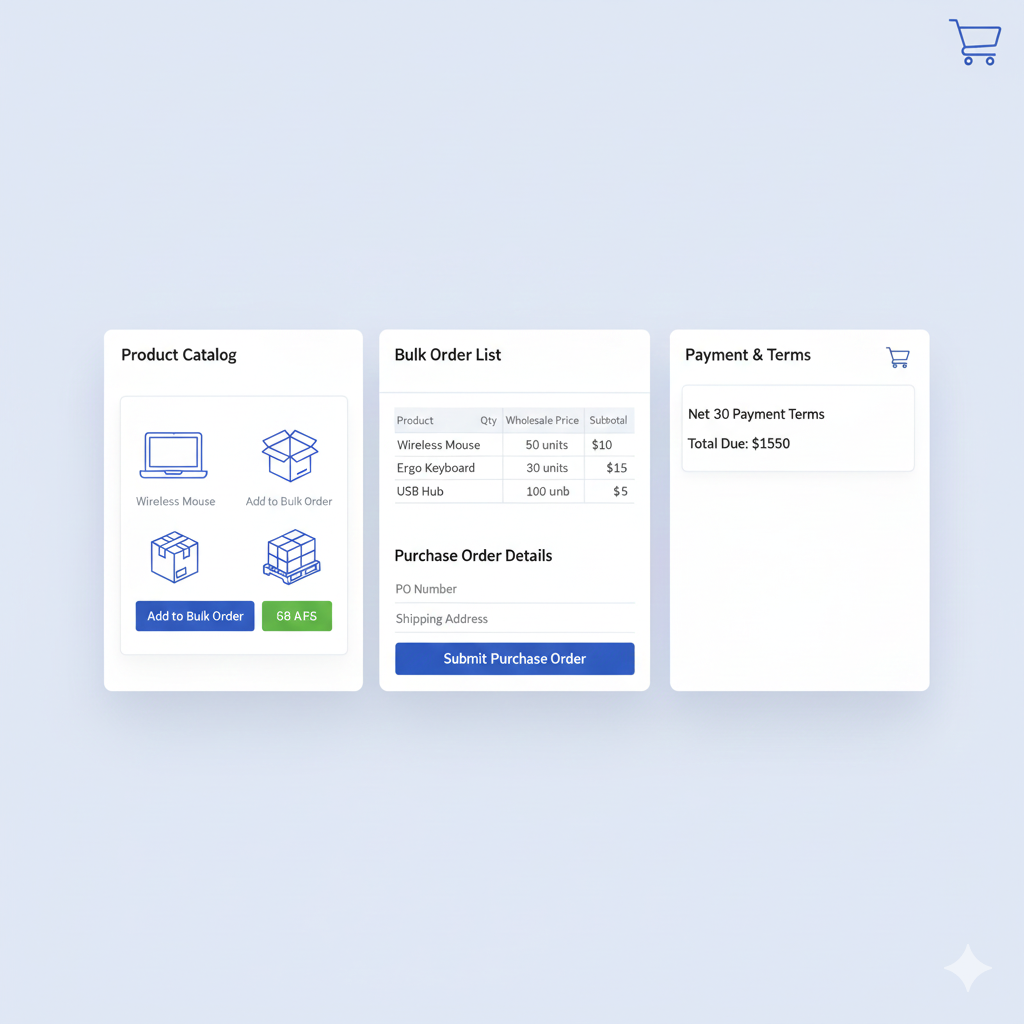
- Create customer-specific price lists
- Set bulk discounts
- Accept purchase orders
- Show unique catalogs for each buyer
- Offer net payment terms (e.g., Net 30)
All inside one store.
Why Beginners Should Care
Shopify B2B helps you:
- Sell wholesale without coding
- Manage retail and wholesale in one dashboard
- Avoid expensive custom development
- Scale your business faster
- Offer a professional buying experience
If you want to expand beyond regular customers, Shopify B2B is the easiest path.
Why Shopify B2B Is Trending in 2025
1. B2B eCommerce is booming
Businesses now prefer online ordering over phone calls or manual quotes.
Global B2B eCommerce is expected to hit $25 trillion by 2030.
2. Shopify expanded B2B features
In 2023–2025, Shopify added:
- Company profiles
- Volume pricing
- PO (Purchase Order) workflows
- B2B checkout customization
- Multi-location purchasing
- Vaulted payment methods
- Net terms automation
This transformed Shopify from a B2C platform to a serious wholesale solution.
3. Companies want simpler tech stacks
Brands are tired of using:
- A separate wholesale site
- A quoting system
- A payment portal
- An ERP connector
Shopify B2B combines these in one place.
4. Buyers expect a modern experience
Retailers want:
- Quick reorders
- Saved carts
- Buyer accounts
- Transparent pricing
Shopify delivers all of this.
Benefits of Shopify B2B
✔ Unified Storefront
Run wholesale and retail from one store.
Save time, reduce errors.
✔ Personalized Pricing
Every buyer sees their own price lists.
✔ Volume Discounts
Encourage large orders with automated bulk pricing.
✔ Faster Orders
Buyers get simple, Amazon-like B2B checkout.
✔ Net Payment Terms
Offer Net 15, 30, or 60 directly in the system.
✔ Reduced App Costs
Many features that required paid apps are now native.
✔ Real-World Mini Case Study
A mid-size apparel brand eliminated 5 wholesale apps and shifted fully to Shopify B2B.
They reduced costs by 40% and increased wholesale orders by 70% thanks to custom catalogs and easy reorders.
Step-by-Step Beginner Guide to Using Shopify B2B
Step 1 — Set Up Company Profiles
Company profiles let you manage buyers at the company level.
Actions to take:
- Go to Customers → Create Company
- Add buyer locations
- Assign different buyers to one company
- Set payment terms
- Select catalogs or price lists
Tools:
Shopify Admin, Shopify Plus (for advanced controls)
Pro Tips:
- Add multiple contacts (purchasing, accounting, owner).
- Keep pricing consistent across locations.
Step 2 — Create Custom Price Lists
Price lists control what each buyer sees.
Actions:
- Go to B2B → Price Lists
- Assign product-specific pricing
- Create volume discounts
- Set multi-currency pricing
Tools:
Built-in price list editor, CSV importer
Tips:
- Use tiered pricing to boost order size.
- Engage top buyers with exclusive pricing.
Step 3 — Enable B2B Checkout + Terms
Wholesale buyers need professional checkout options.
Actions:
- Enable Net Terms
- Allow Purchase Orders (POs)
- Save payment methods
- Activate B2B discounts
Tools:
Shopify B2B Checkout, Shopify Payments
Tips:
- Offer Net 30 only to trusted buyers.
- Display PO numbers on invoices for clarity.
Step 4 — Customize Catalogs for Each Buyer
You can show different products to different wholesale customers.
Actions:
- Build custom catalogs
- Set minimum order quantities
- Enable bulk order form
Tools:
Shopify’s store themes + B2B templates
Tips:
- Hide DTC-only products from wholesale buyers.
- Create seasonal catalogs to increase reorders.
Step 5 — Automate Reorders
Buyers reorder the same items often.
Shopify lets them reorder with 1 click.
Actions:
- Enable saved carts
- Activate reorder reminders
- Use email automation (Shopify Flow)
Tips:
- Send reorder suggestions every 30–60 days.
- Highlight best-selling SKUs in reorder emails.
Best Tools and Resources for Shopify B2B
1. Shopify Plus
For brands scaling wholesale operations.
Use it for advanced B2B pricing, terms, and automation.
2. Shopify Markets
For global B2B.
Handles currencies, duties, pricing.
3. Shopify Flow
Automates wholesale tasks like tagging, approvals, and reminders.
4. Releasit COD Form
For B2B stores offering cash-on-delivery in certain regions.
5. Klaviyo or Omnisend
For email workflows tailored to wholesale buyers.
6. ERP Integrations (via Shopify partners)
Useful for large inventory operations.
Common Mistakes to Avoid
- Using a separate wholesale website — increases workload.
- Not setting minimum order quantities — reduces profit margins.
- Showing all products to all buyers — causes confusion.
- Offering net terms to everyone — increases risk of unpaid invoices.
- Ignoring reorder automation — leads to lost sales.
- Using too many apps — slows your store and complicates workflows.
Solution:
Use Shopify’s built-in B2B features before adding third-party tools.
Expert Insights + Future Predictions
1. Personalized wholesale storefronts
Buyers will see dynamic catalogs based on buying behavior.
2. AI-assisted wholesale ordering
AI will suggest restocks, forecast demand, and create purchase orders.
3. Deeper ERP and inventory integrations
Reducing manual data entry entirely.
4. B2B subscription models
Wholesale buyers will subscribe to monthly restocking plans.
5. B2B marketplaces
Brands will join “multi-supplier Shopify marketplaces” to reach new retailers fast.
Conclusion
Shopify B2B is changing how wholesale operates.
It simplifies pricing, ordering, payments, and customer management—all in one system.
If you want to expand into wholesale or streamline your existing B2B operations, Shopify gives you the tools to grow without complexity.
Your next step:
Tell me your business type, and I’ll help you set up the perfect Shopify B2B structure.